
AI Strategy
Your AI Coworker Needs an Offboarding Plan Before It Needs a Bigger Model
The new Blueprint Alliance treats AI coworkers as identities that must be discovered, owned, scoped,...
NVIDIA's March enterprise agent push made one thing clear: the market is moving past simple automation. Here's the practical difference between AI automation and AI agents, and why SMBs need to know which one they're actually buying.
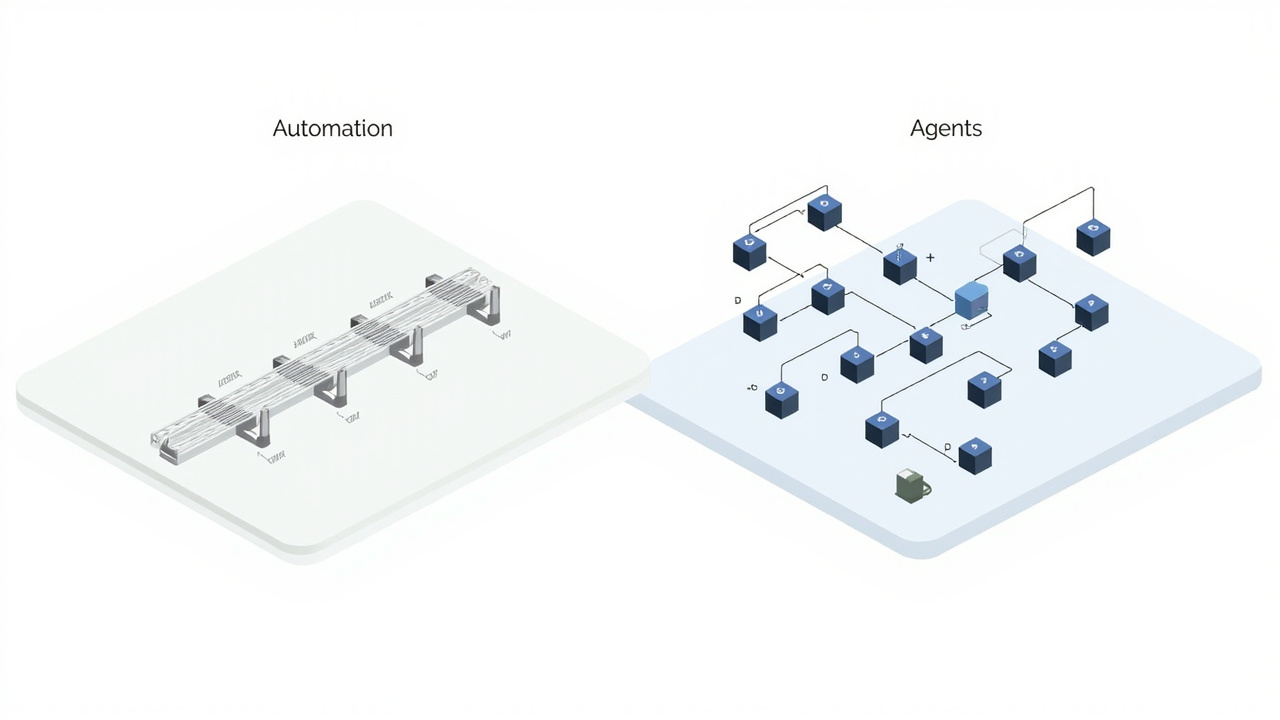
On March 18, NVIDIA announced its new open platform for enterprise AI agents and framed the shift in blunt terms: software is moving from generation and reasoning into action. That matters because the market has spent the last year calling nearly every AI workflow an "agent," even when it is really just automation with better copy.
That confusion is expensive. If you think you bought an agent when you actually bought an automation, you will hand it work that breaks the first time reality changes. If you think all automation is the same as agency, you will miss where real operational upside starts.
This is the practical difference in the simplest possible form: automation follows a path you define ahead of time. Agents decide how to move toward a goal inside boundaries you define ahead of time.
That is not a semantic distinction. It is the difference between a system that stops when an input changes and a system that can still move the work forward.
AI automation is still automation.
A trigger happens. The system follows a sequence. It applies rules, templates, conditions, and predefined branches. Sometimes there is a language model inside the workflow to classify text, summarize notes, draft a response, or extract data from a document. That does not change the architecture. The system is still moving along a path you designed in advance.
This is why tools like Zapier, Make, and many no-code AI builders are useful. They handle stable, repetitive workflows well.
A new lead submits a form. Route it to the CRM. Generate a summary. Notify sales. Send a follow-up email. Create a task. That is automation. It can save real time and reduce real manual work.
The problem starts when people expect it to do more than it was built to do.
Automation does not understand the job. It executes the sequence.
If the customer email arrives in an unexpected format, if the CRM field changed names, if the policy exception lives in a PDF no one mapped into the workflow, or if the right response depends on business judgment, the automation has nowhere to go. It either fails, routes incorrectly, or produces output that looks acceptable until someone notices it was wrong.
That does not make automation bad. It makes it bounded.
Good automation handles high-volume, low-ambiguity work where the path is clear and the exceptions are rare.
Examples:
In all of those cases, the workflow is predictable. You can define the branches ahead of time.
Bad automation is what happens when a business gives a brittle workflow a job that requires judgment.
Examples:
That is where teams start saying automation "worked in the demo" but "got weird in production." The real issue is simpler: they assigned adaptive work to a non-adaptive system.
Agents are built around goals, tools, memory, constraints, and escalation boundaries.
Instead of following only one fixed path, an agent can evaluate a situation, choose among available actions, use tools, gather more context, and decide whether it should proceed or hand the work to a human. The work is still bounded. The agent is not magic. But it is operating on a different model.
This is exactly why the March wave of AI news matters. NVIDIA is not pushing "smarter automations." It is pushing infrastructure for systems that can reason, act, and complete multi-step enterprise tasks. Google spent March shipping tools that make Gemini more context-aware across files, email, and workspace data. Shopify is publicly preparing for agentic shopping. The market is moving toward software that does not just wait for the next trigger. It evaluates context and takes the next step.
That shift only makes sense if we stop pretending automation and agents are interchangeable.
An agent does not need a hard-coded branch for every possible variation. It needs:
That is why agents can handle edge cases better. They are not guessing randomly. They are reasoning within an operating boundary.
The cleanest way to understand AI automation vs AI agents is to ask a single question:
When the environment changes, does the system stop and wait for a new rule, or can it still move toward the goal?
Automation waits for a new rule.
Agents can often keep moving.
That is the dividing line.
A workflow says: "If this happens, do that."
An agent says: "The goal is this outcome. Given the current situation, what is the best permitted next step?"
The distinction sounds subtle until you put it inside real business operations.
A workflow can send a renewal reminder 30 days before contract end.
An agent can review the account, notice unresolved support issues, summarize usage patterns, draft a retention-oriented outreach note, flag revenue risk, and escalate the account because the right next step is no longer a standard reminder.
A workflow can assign a task when a ticket status changes.
An agent can notice that the task is blocked by missing information, pull the missing context from a shared system, ask the right follow-up question, and re-route the work to the correct owner.
This is also why multi-agent systems outperform isolated assistants in more complex environments. One system follows a script. The other organizes work around roles, responsibilities, and handoffs. If you want the deeper version of that argument, start with your AI agents need a manager and then see running multiple OpenClaw agents without losing control.
Most SMBs do not fail with AI because the model is weak. They fail because the architecture does not match the job.
A lot of businesses buy automation when they really need coordinated execution.
That happens for three reasons.
Vendors call everything an agent now.
A template with a trigger, a prompt, and three API calls becomes an "autonomous worker." A chatbot with one integration becomes an "operations agent." That language is useful for demos and terrible for decision-making.
If the system cannot choose among actions, handle exceptions, and escalate intelligently, you are not looking at an agent in the operational sense that matters.
Automation has a low starting cost.
That is part of the appeal. You can put together a workflow quickly and see activity immediately. But activity is not the same as durable output. A cheap workflow that breaks every time a process changes is not actually inexpensive. It just hides the cost in rework, cleanup, and manual supervision.
This is the most common mistake.
A workflow that generates fluent text feels smarter than it is. Because the message reads well, teams assume the system understood the work. Often it did not. It simply produced plausible language inside a brittle process.
A lot of so-called AI automation is really a rules engine wearing a very convincing writing layer.
The easiest way to choose between automation and agents is to look at the shape of the work.
Use automation when:
Examples include standard notifications, routine data movement, document tagging, scheduled reminders, and clearly defined intake flows.
This is still valuable work. Plenty of businesses should do more of it.
Use agents when:
Examples include project coordination, operational follow-up, issue resolution, customer account management, and recurring cross-functional work where the inputs change every week.
That is the category where agents start compounding value instead of just shaving minutes off a task.
This is where a lot of teams get tripped up. They understand they need something more adaptive than automation, but they still deploy agents badly.
Bad agent design sounds like this:
"Handle customer operations."
"Manage the project queue."
"Keep the team on track."
Those are goals in English, not operating instructions.
A badly designed agent has broad language, vague authority, weak boundaries, and no clean escalation rules. It has access to tools but no explicit decision model for when to use them. It may take too much action, too little action, or the wrong action with confidence.
Good agent design is specific.
For example: the agent monitors open implementation tasks, checks owner updates twice weekly, flags blockers older than five business days, gathers missing context from the project system, drafts a status summary for leadership, and escalates only when the blocker affects revenue, delivery timing, or customer commitments.
That is an agent boundary.
The agent knows the goal, the data sources, the triggers, the action space, and the escalation conditions.
This is why the infrastructure around the agent matters more than the model headline. If your operating boundary is vague, a better model only gives you a more articulate problem.
If you are evaluating a platform and trying to decide whether it is automation, an agent system, or marketing language, ask these five questions.
If the answer is basically "you update the workflow manually," you are looking at automation.
If it only follows one defined sequence, that is automation.
If not, you are not looking at a serious agent deployment. You are looking at a system that either overacts or stalls.
A real operational agent needs more than a single chat surface. It needs access to the systems where work lives and enough structure to act responsibly.
Automation usually fails hard and visibly. Agents often fail more subtly if designed poorly. The right provider can explain both how the system works and how it breaks.
That answer matters more than the demo.
The current news cycle is useful because it removes any doubt about where the market is going.
The large platforms are not investing billions to help you build slightly better if-this-then-that chains. They are building systems for long-running, tool-using, context-aware software that can coordinate work. That is showing up in commerce too, with Shopify openly preparing for agentic shopping as AI becomes the new front door to product discovery.
That does not mean every business needs agents everywhere.
It means every business should stop using one label for two very different categories.
The right architecture is usually a mix:
That is what mature deployments look like.
The companies that get ahead will not be the ones that shout "agents" the loudest. They will be the ones that know exactly which work should remain automation, which work needs agency, and where the human boundary belongs.
Q: What is the simplest difference between AI automation and AI agents?
A: Automation follows predefined rules and sequences. Agents pursue a goal within defined boundaries and can choose among actions based on context.
Q: Are AI agents always better than automation?
A: No. Automation is better for stable, repetitive work with clear branches and low ambiguity. Agents are better when the work changes often, spans systems, or requires interpretation before action.
Q: Can an automation include AI and still not be an agent?
A: Yes. Adding a model to summarize text, classify emails, or draft replies does not automatically create an agent. If the workflow still depends on predefined paths, it is automation.
Q: What kinds of small-business work are best for agents?
A: Cross-functional follow-up, operational coordination, issue management, customer account workflows, and work where exceptions happen regularly are strong agent candidates.
Q: What is the biggest buying mistake businesses make here?
A: They buy a fluent workflow and assume fluency equals judgment. Good language output can hide weak operational design.
Most businesses do not need to choose between automation and agents as ideologies. They need to choose the right tool for the job. Stable work should be automated. Adaptive work should be agent-managed. The mistake is pretending those are the same category and discovering the difference only after the system is in production.
If your team is trying to sort out where automation is enough and where you need an actual agent system, Associates AI helps businesses design the operational layer correctly from the start. You can book a call to walk through your workflows and see where the boundary really sits.
Written by
Founder, Associates AI
Mike is a self-taught technologist who has spent his career proving that unconventional thinking produces the most powerful solutions. He built Associates AI on the belief that every business — regardless of size — deserves AI that actually works for them: custom-built, fully managed, and getting smarter over time. When he's not building agent systems, he's finding the outside-of-the-box answer to problems that have existed for generations.
More from the blog
The new Blueprint Alliance treats AI coworkers as identities that must be discovered, owned, scoped,...

Jobber's new Teammate does three things most AI products still avoid: briefs the owner, prepares wor...

NIST, IBM, and WSO2 all moved on machine identity this week. The harder problem is action-level auth...
Want to go deeper?
Get started today. Hire your first Teammate in minutes and put it to work on what you're reading about.
Get Started