Messaging channels
Wiring Telegram, Discord, or Slack to a Teammate, the Slack connection wizard, allowlists, and Teammate identity.
One channel per Teammate
Each Teammate connects to exactly one messaging channel: Telegram, Discord, or Slack. If you want the same role reachable on two channels, that's two Teammates, each with its own bot account and its own configuration.
Add your channel ID before you're reachable
Telegram and Discord Teammates will not respond to you at all until your channel user ID is on their allowlist — there's no way to message them "blind" on those two channels. Slack is the one exception: a Slack Teammate responds to anyone in the workspace, no ID required, but only when its access is set to "Everyone in your company" (see below).
Add your own ID from your profile's Channel Accounts section — Telegram User ID, Discord User ID, or Sign in with Slack — before you try wiring up a channel. Once it's there, it's available in the dashboard's allowlist picker for any Teammate you configure, and every teammate on your team needs to do the same for themselves.
Linking your channel account here is also what gives a Teammate private memory of your direct messages. Direct messages from an account that isn't linked aren't remembered at all, and messages sent before you link aren't added retroactively once you do.
Telegram
Connecting Telegram takes a bot token, plus a streaming-mode setting for how replies are delivered — showing tool-activity progress before the final answer (the default), streaming the answer in token by token, arriving in larger chunks, or holding back everything until only the finished answer is shown. The main Teammate on an agent server additionally holds an owner allowlist — the Telegram user IDs allowed to talk to it.
Discord
Discord works the same shape: a bot token and streaming mode, with the main Teammate holding a user-ID allowlist for who can reach it.
Slack
Slack takes more setup because each Teammate gets its own Slack app. The connection wizard walks you through it in four steps:
-
Config token. You paste a configuration token from
api.slack.com. The platform uses it to create the Slack app for you, from a manifest that requests the right scopes and turns on socket mode.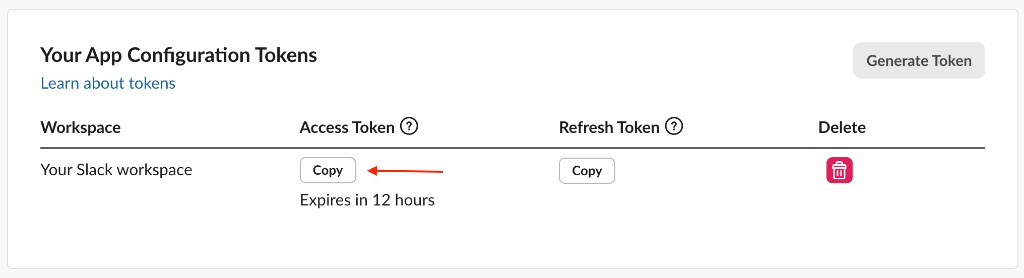
-
App-level token. In your new Slack app's settings, open the app-level tokens panel and generate a token with the right scope.
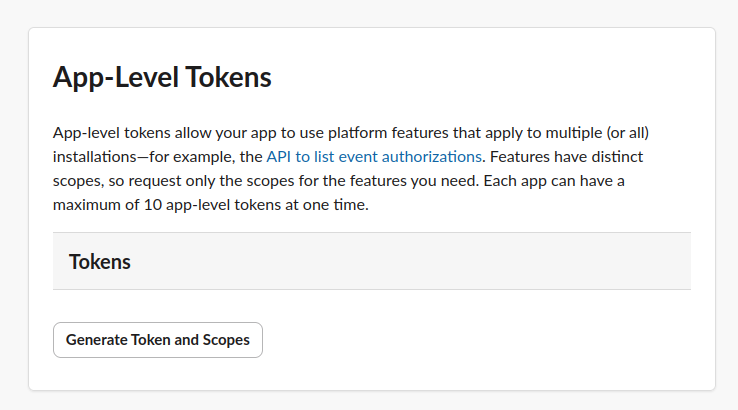
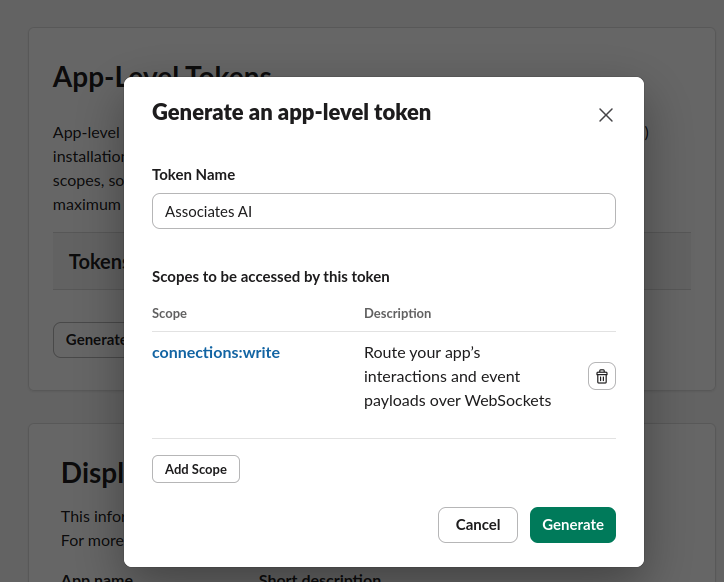
Paste the
xapp-…token back into the platform, and it verifies the token against Slack before continuing. -
Install. You complete an OAuth install of the app into your workspace; once it succeeds, the bot token is stored and the Teammate is live on Slack.
-
Disconnect. Disconnecting at any point wipes the Slack credentials for that Teammate, so you can start the wizard over cleanly if something goes wrong.
Slack also has its own slash command, defaulting to /aai. One thing to know about it: don't use it to send commands — it isn't a way to run them. Mention the Teammate first instead — @Teammate /status — which always targets that Teammate and works for every command. Make that your habit on Slack and you can skip the slash command entirely.
Slack's allowlist also works differently from Telegram/Discord: you choose between Everyone in your company (no restriction) and Only selected users, where selected mode requires at least one user picked — you can't save an empty selected allowlist. The choice applies to DMs and channels alike: in selected mode the Teammate answers the selected users when they DM it or @-mention it in a channel it has been invited to, and ignores everyone else.
Replying inside a Slack thread keeps that reply's conversation on its own track, whether the thread is in a channel or in a direct message — a scheduled report or another exchange posted into the same channel or DM won't bleed into it. Starting a fresh top-level message, in a channel or a DM, keeps using your regular ongoing conversation with the Teammate.
Allowlists are on by default
Every channel ships allowlist-gated: unless you deliberately open a channel to everyone, only the people you've explicitly listed can talk to a Teammate. This is a safety default, not a limitation to work around — treat the allowlist as the actual access-control boundary for who reaches your Teammates.
Team members' channel user IDs come from their individual profiles, not from you typing them in blind — the allowlist picker in the dashboard lets you pick from your team's saved profile IDs directly.
Teammate identity
Independent of which channel it's on, a Teammate has an identity: a display name and an avatar. Avatars accept JPEG or PNG, up to 2 MB.
API and MCP
Messaging configuration, Teammate identity, and the Slack connection wizard all have full dashboard/API/MCP parity. See API & MCP for the resource map.