Texting
Turn on text messages from your Teammates: verify your mobile number, tick the consent box on your profile, and how to stop texts again with STOP or the same box.
What texting islink
Texting lets your Teammates send text messages to your own mobile number about your work. Texting is optional and is never a condition of using Associates AI. Only you can turn it on, and only for your own number. Nobody can add your number for you.
Message frequency varies with your requests. Message and data rates may apply.
Turn texting onlink
- Open your Profile and find Phone number.
- Verify your mobile number with the 6-digit code we send you (see Verify your own number).
- Tick the box under your verified number. It is unticked by default, and texting stays off until you tick it.
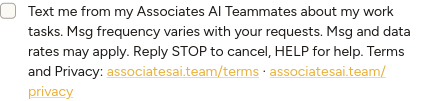
When you tick the box we save your consent, with the time and the wording you agreed to, and send you one confirmation text. It names Associates AI, says how often to expect messages, and tells you to reply HELP for help or STOP to opt out.
Stop textslink
Either of these stops texts:
- Reply STOP to any text from us.
- Untick the box on your profile.
Reply HELP to any text to get help, or email hello@associatesai.team.
Changing or removing your verified number also ends your consent. If you verify a new number you will need to tick the box again.
Privacylink
We use your mobile number only to send you the texts you asked for. We do not share mobile numbers or text-messaging consent with third parties or affiliates for marketing or promotional purposes. See our Privacy Policy and Terms.